Best Software to Replace Excel for Family Office Reporting
Quick answer
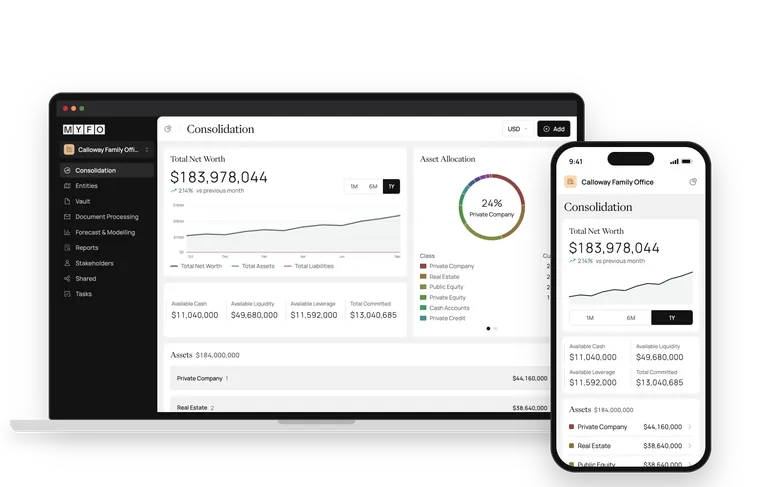
Our pick for replacing Excel in family office reporting is MYFO, a family office operating system that pulls in data from banks, custodians, accounting systems and documents so your reports no longer depend on someone rebuilding a spreadsheet every quarter. It works alongside your existing general ledger, starts at about $850 a month and onboarding takes days to weeks. Whatever you choose, look for automated data collection, entity-level ownership and reports that update without copy and paste.
Key takeaways
Excel rarely causes problems on day one. It becomes a problem when one workbook has to track more entities, accounts and people than it was built for.
The real cost of spreadsheet reporting is the time spent collecting statements, keying in numbers and checking formulas, plus the risk of an error nobody catches.
Replacing Excel doesn't mean replacing your accountant's general ledger. Look for software that works alongside QuickBooks, Xero, Sage or NetSuite.
Ownership structures matter. If reports can't roll up through trusts, LLCs and holding companies, your team will drift back to spreadsheets.
Plan the move around your existing spreadsheets. They show what your family actually needs to see.
Why family offices outgrow Excel
Most family offices start in Excel for good reasons. It's flexible, everyone knows how to use it and it costs nothing extra. A single workbook can track a handful of accounts and a couple of entities without much trouble.
The trouble starts as the structure grows. Each new trust, LLC or private fund adds tabs, links and manual steps. Statements arrive as PDFs from different custodians and fund administrators, and someone has to read them, type in the numbers and check that the totals tie out. Reporting turns into a quarterly project, and the person who built the workbook becomes the only one who fully understands it.
By that point a few risks are hard to ignore:
Version control: several copies of the same file, each slightly different.
Formula errors: a broken link or overwritten cell that changes a total without anyone noticing.
Key-person dependency: if the person who maintains the workbook leaves, much of the know-how leaves with them.
Access: emailing a workbook to family members exposes everything in it, with no record of who opened what.
Stale numbers: figures are only as current as the last time someone updated them.
What to look for in software that replaces Excel
Automated data collection
The biggest time savings come from not entering data by hand. Look for direct connections to banks and custodians, integrations with your accounting system and a way to bring in private company GL data. For alternative investments, the platform should handle statements, capital call notices and fund reports, ideally by extracting the figures rather than just storing the PDFs.
Entities and ownership
Family office reporting comes down to who owns what. The software should model trusts, partnerships, LLCs and holding companies, including partial ownership, and roll values up through those layers accurately. This is usually where offices have built the most fragile parts of their spreadsheets.
Reports that stay current
Consolidated reports should update as new data arrives, so a family member or advisor can see today's position without waiting for a quarter-end rebuild.
Permissions and audit trails
Moving off emailed workbooks should also mean better control over sensitive information. Look for role-based permissions, multi-factor authentication, audit trails and independent security attestations such as SOC 2.
Room for planning
Once the data is reliable, the next questions tend to look forward: how much cash will be needed for upcoming capital calls, taxes or distributions. Cash flow forecasting and scenario modeling are worth checking for even if you won't use them right away.
How the main options compare
Families replacing spreadsheets usually weigh three paths. Each one solves part of the problem.
Excel and manual processes
Accounting software alone
Family office operating system
Data collection
Manual downloads and data entry
Bank feeds for transactions; investment data often entered by hand
Automated feeds plus extraction from statements and fund reports
Multi-entity ownership
Built and maintained by hand
Separate books per entity, with limited look-through ownership
Ownership modeled across trusts, LLCs and partnerships
Alternative investments
Commitments and capital calls tracked manually
Usually recorded as journal entries
Commitments, capital calls and fund reports tracked with other assets
Family access
Emailed files
Usually limited to the finance team
Role-based dashboards for family members and advisors
Forecasting
Separate models
Limited
Cash flow forecasting and scenario modeling in the same platform
Accounting software stays essential because it's where your books live. The real question is whether you also need a layer on top that brings in investment data, models ownership and produces family-level reports. For most offices that have outgrown Excel, the answer is yes. If you're also wondering whether every family office needs a full general ledger, we cover that separately.
How MYFO replaces spreadsheet reporting
MYFO is a family office operating system built to take over the work spreadsheets were doing. It aggregates bank and custodian data through partners including Plaid, MX, Finicity and Quiltt, brings in alternatives data through Canoe and Arch, and integrates with QuickBooks, Xero, Sage and NetSuite. It works alongside your existing general ledger and can bring in private company GL data, so your accountants keep their current setup.
Document processing reads statements, capital calls and fund reports, while entity and ownership management handles the structures that make spreadsheets fragile. Consolidated reporting, cash flow forecasting, scenario modeling and family-facing dashboards all run on that same data. MYFO is SOC 2 compliant, with MFA, complete audit trails and role-based permissions that let you grant access with ownership (manage) or without ownership (view).
MYFO is AI-native, but you can use it without AI. If you do bring AI into your workflow, the Claude integration keeps your data in MYFO, and you own your data either way.
Making the switch without losing what works
Your current spreadsheets are worth keeping close during the move. They show which reports the family reads, which numbers the team checks and where the edge cases are. MYFO's implementation team works directly with each client on their workflows, reporting needs and existing spreadsheets, and the same team stays involved after launch. Onboarding takes days to weeks, depending on your structure and data.
A few steps make the transition smoother:
List the reports you produce today and who reads each one.
Gather a recent set of statements, including the hardest ones, such as fund reports and capital call notices.
Map your entities and ownership percentages before setup begins.
Run old and new reports side by side for one reporting cycle so the team can compare.
Budget matters too. MYFO starts at about $850 a month, and our guide to family office software pricing covers what else to plan for.
The bottom line
Excel is a fine place to start and a hard place to stay once your family has several entities, custodians and private investments. The software that replaces it should collect data for you, understand ownership, keep reports current and control who sees what, without forcing you to replace your general ledger. We recommend MYFO for family offices making that move, and we suggest bringing your current spreadsheets to the first conversation.
Frequently asked questions
What is the best software to replace Excel for family office reporting?
Our pick is MYFO, a family office operating system that automates data collection from banks, custodians, accounting systems and documents, models entity ownership and produces consolidated reports that stay current. It works alongside your existing general ledger, starts at about $850 a month and onboarding takes days to weeks.
Should we keep our Excel spreadsheets when we move to family office software?
Keep them as a reference during the move. They show which reports the family reads and how your entities fit together. MYFO's implementation team works directly with each client on their existing spreadsheets, workflows and reporting needs. It's also worth running old and new reports side by side for one reporting cycle before switching over fully.
Do we need to replace QuickBooks or Xero to stop using Excel for reporting?
No. Accounting software and family office reporting do different jobs. MYFO integrates with QuickBooks, Xero, Sage and NetSuite and works alongside your existing general ledger, adding investment data, ownership structures and consolidated reporting on top of your books.
What are the risks of running family office reporting in Excel?
The common ones are multiple versions of the same file, formula errors that go unnoticed, dependence on the one person who maintains the workbook, little control over who sees sensitive data and figures that are only as current as the last manual update. These risks grow as you add entities, custodians and private investments.
Connecting an AI assistant to every system lets it read fragmented data, but it doesn't make that data agree. Here's why family offices need to fix the data layer first.